
Plan the week, calmly
Timetable
A drag-and-drop weekly planner built for special needs schools — subjects, classes and staff onto a simple grid, then publish it straight to the family and staff apps.
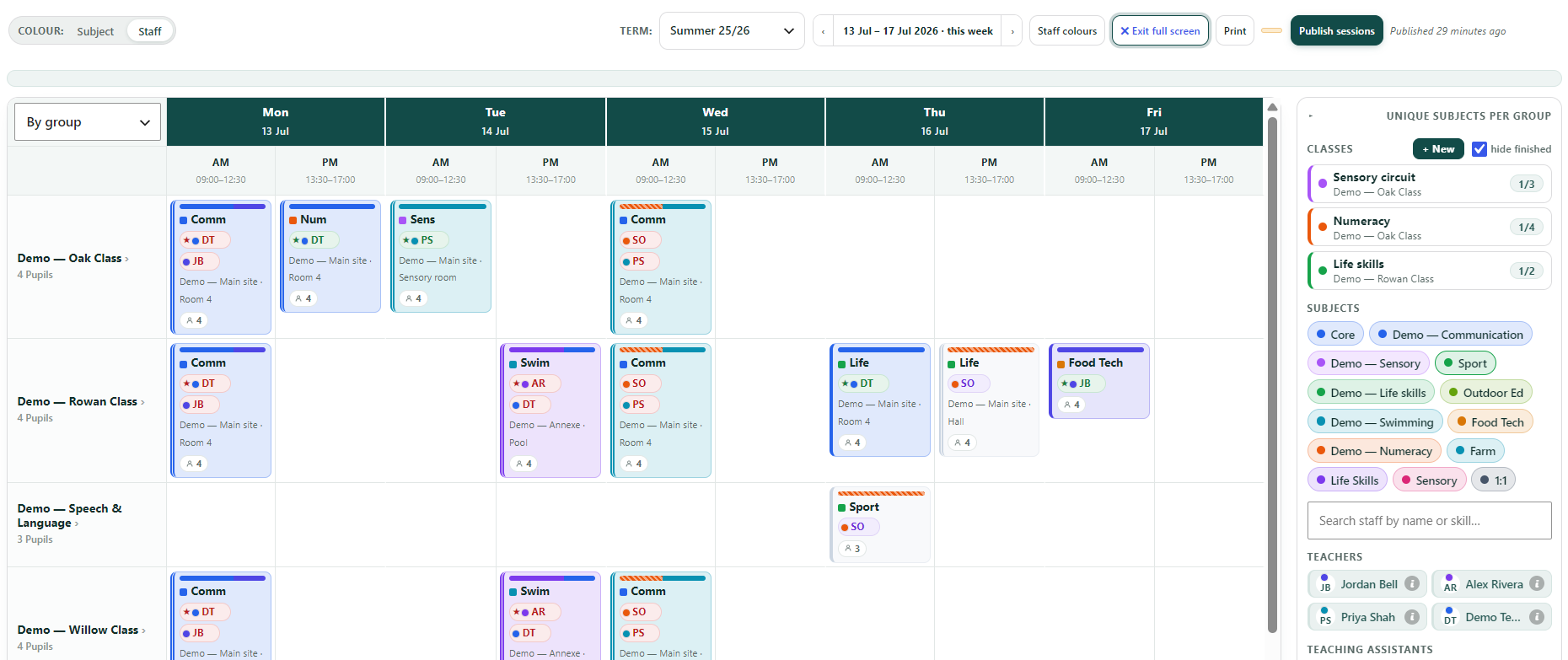
What the planner does
A timetable that fits how SEN schools actually run
🗓️ Drag-and-drop planning
- Drag subjects, classes and staff onto a weekly grid
- Frozen day, period and group headings — scrolls when the week is busy
- Tap-to-place on a phone or tablet, as well as drag on a desktop
- Or import an existing timetable from a CSV or Excel file
- Expand to a full-screen planner when you need room to think
🔭 One plan, five views
- See the same week by group, teacher, TA, subject or room
- Colour sessions by staff so gaps and clashes jump out
- Unstaffed sessions show in light grey — nothing slips through
- Clash detection when a person is double-booked
🧩 Reusable classes
- Build a class once — a subject, a target and its groups
- A class can serve several groups; place it for all at once
- Pick a class’s default room — from a managed list, organised by site
- A per-week session target shows progress as you plan
👥 Staff & skills
- Add teachers and TAs, and set a lead for each session
- Give subjects required skills; a warning if a teacher lacks one
- Staff a whole multi-group placement in one prompt
- Search by name or skill; automatic, easy-to-tell-apart colours
🔁 Terms & rota weeks
- A separate board per term, tied to your term dates
- Two-week A/B rotas, or a plain repeating week
- Customise a single week without touching the pattern
- Per-session pupil attendance — mark who is out, when
🚀 Draft, review, publish
- Edit freely — an “unpublished changes” badge keeps count
- Review exactly what changed before it goes live
- Publish to pupils and parents in Willow, and to staff registers
- Keep working in draft until you are ready
From blank grid to live in three steps
How it works
1
Set up your week
Add your periods and days, your terms, and the subjects and classes you teach — each with a colour and, if you like, the skills it needs.
2
Drag it together — or import it
Drop classes onto the grid, add the staff, set leads and rooms — or import an existing timetable straight from a spreadsheet. Switch views to check it from every angle and catch clashes.
3
Publish it
Review your changes, then publish — pupils and parents see their day in Willow, and staff see it on their registers.
Build a timetable in the live demo
A full sample school, ready to click around. No sign-up.